Welcome, TidBITS reader. Your holdings are stored only on your Mac, and connecting a brokerage is optional. ZBee needs an Apple silicon Mac (About This Mac shows the chip) with macOS 11 or later.
Measured from the holdings you actually own, after every tax, on your Mac, with the arithmetic open for you to check. Every feature free for 30 days, then $132 a year.
This looks like an Intel Mac. ZBee needs Apple silicon (M1 or later), so it won't open here — better to say so now than after a download.
Grabbing it for an Apple silicon Mac? Download anyway.
ZBee is a native Mac app — we'll email or text you the download link to open on your Mac.
No sign-up, no card.
Notarized by Apple · Published by ZBee LLC · Apple silicon (M1 or later), macOS 11 or later · For US taxpayers
There are plenty of retirement calculators. ZBee answers one question — how much can I safely spend? — and answers it from your real money, with real rigor you can check: every method is laid out in the methodology.
Most tools make you type in a balance and a guess at your mix. ZBee reads your real positions: drop in a screenshot or PDF of any holdings page, Vanguard included, or connect Fidelity, Schwab and most major brokerages read-only, so ZBee never sees your login. A CSV or hand entry works too. Real positions, priced from your broker as of your last sync, sorted by tax treatment.
Flat-return calculators quietly overstate what's safe. ZBee replays a thousand market histories — including bad runs early in retirement — then checks your plan against every real market sequence since 1928 and tells you how many it would have survived, naming any it wouldn't.
Federal brackets, capital gains, the taxation of Social Security, state tax, required minimum distributions, withdrawal order, and Medicare IRMAA surcharges — modeled year by year. Your tax bill is an output of the plan, not a number you guess. There's no optimizer, on purpose: enter the Roth conversion plan you or your adviser chose and see exactly what it does.
Cloud planners custody your financial data on their servers. ZBee doesn't: your holdings flow between your Mac and your brokerage's data provider (SnapTrade), read-only, and are never stored on our servers. SnapTrade handles what it reads under its own terms. A screenshot you choose to have read passes through our server and Cloudflare to Claude, Anthropic's AI, and ZBee keeps no copy. Revoke the link and erase your account and data with one click.
No account, no card, nothing to sign up for.
Drop in a screenshot or PDF of your holdings page, connect a brokerage read-only, or enter them by hand.
Vanguard? It can't be linked, so drop in a screenshot, a PDF or its CSV download instead.
Your safe yearly spend, with every year's taxes worked out behind it.
A native Mac app, not a web dashboard. Here's what you actually work with — shown on built-in sample data. The whole plan also exports as a PDF report — year-by-year table, outcome distribution, every assumption disclosed — see a sample.
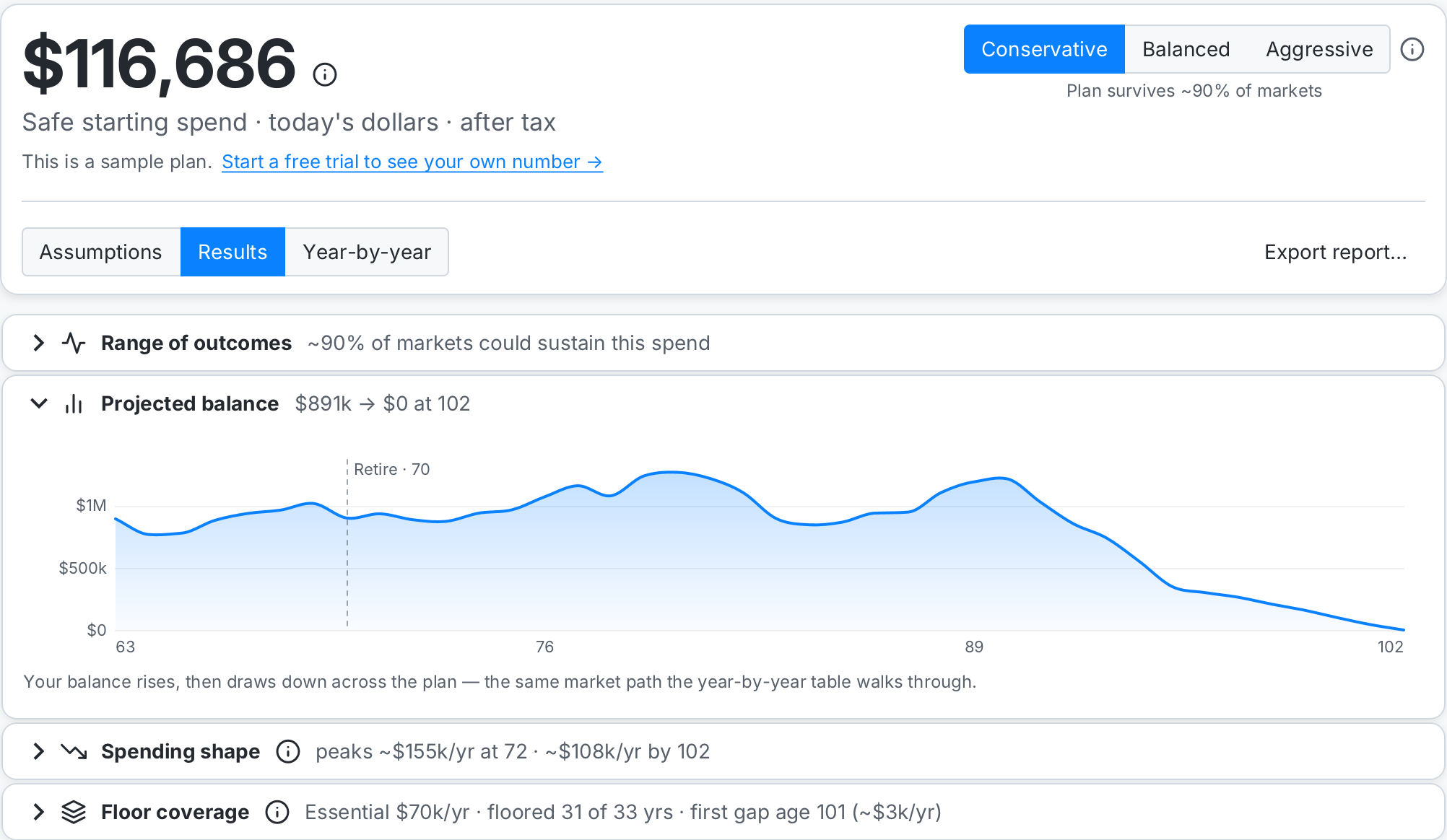
The Projection page on the built-in sample data: a $98,790 safe starting spend — from an ~$900,000 portfolio plus Social Security and a pension, with guardrails on — and the portfolio drawn down year by year in a tough market and a typical one, inside the shaded spread of a thousand simulated markets. The 4% rule would have stopped at 4% of that portfolio, because the portfolio is all it counts; ZBee counts the Social Security and the pension alongside it, and works the tax out year by year. Most of the difference is income you already own. This is the built-in sample plan — your own portfolio takes a connection, a screenshot, or hand entry — and no account.
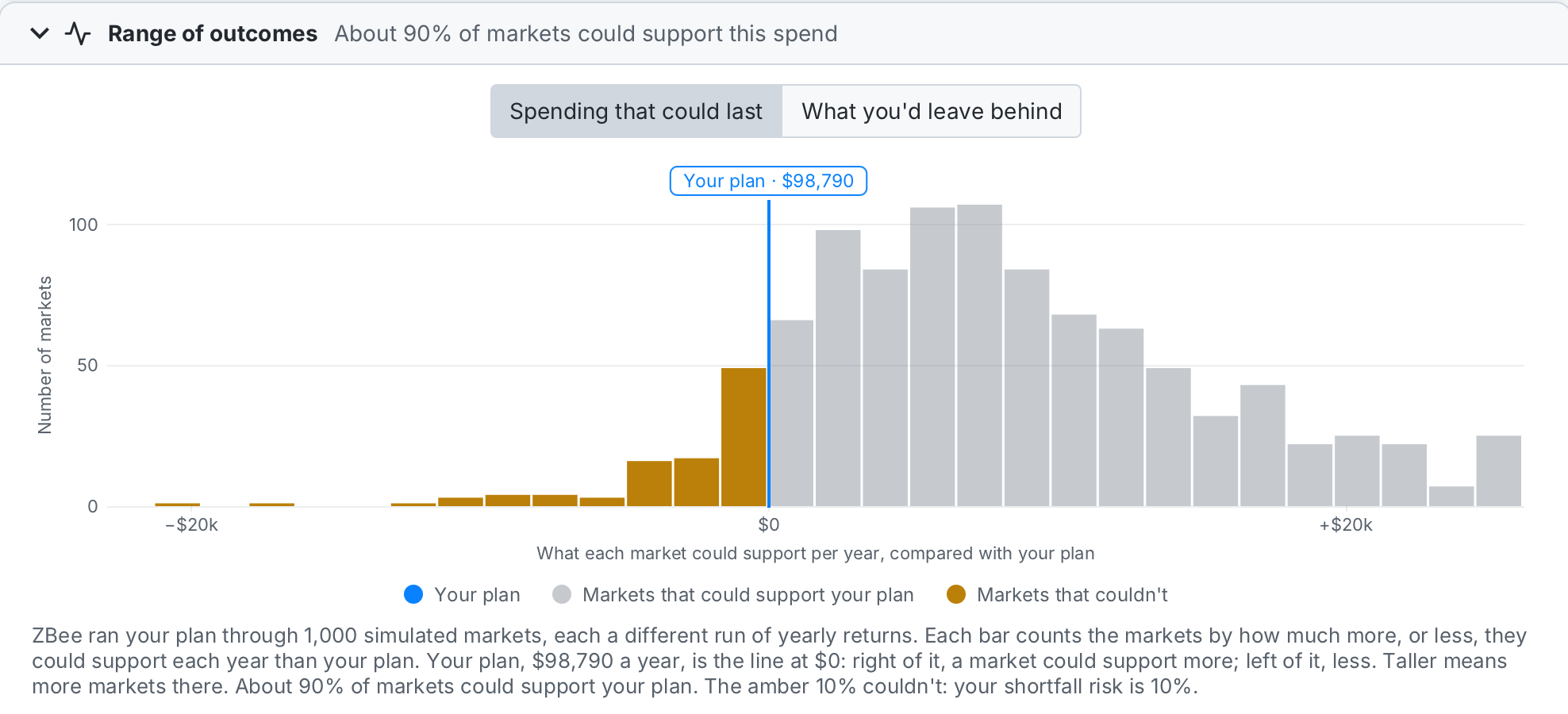
Every bar counts simulated markets by how much more, or less, than your plan they could support each year. Your plan is the blue line at $0: the gray markets to its right could support it with room to spare, the amber ones to its left couldn't. Nudge the mode from Conservative to Aggressive and you watch the amber side grow — the exact trade-off the clip at the top of this page plays. Flip the toggle and the same thousand markets show what you'd leave behind instead.
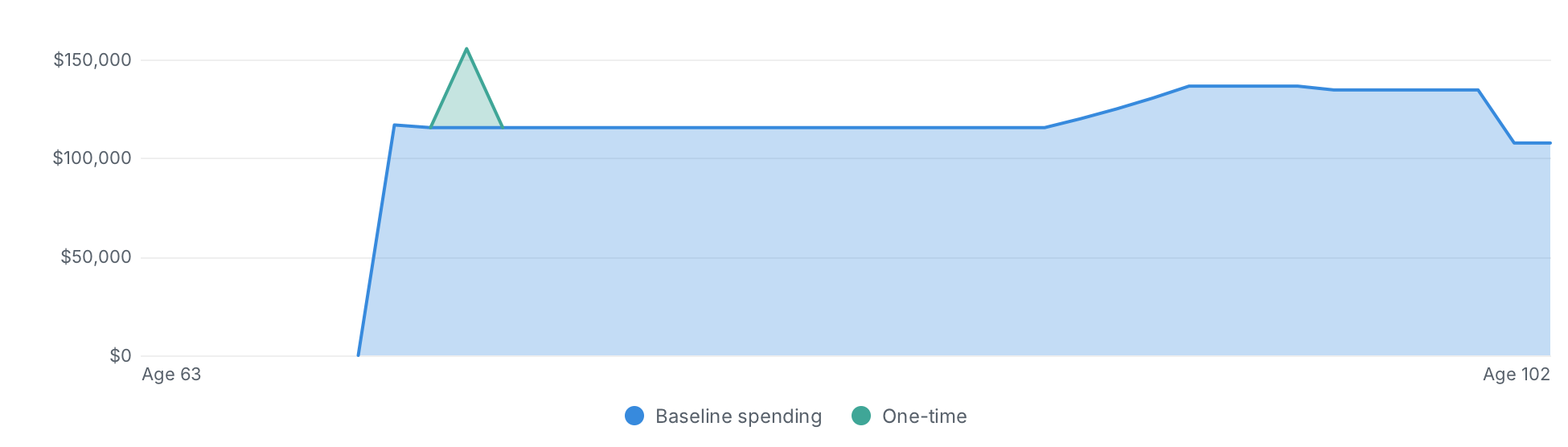
Your plan drawn the way it's actually consumed — year by year, in a typical market, the likelier outcome. The steady baseline is the sustainable paycheck; the spike is a one-time expense standing out against it, which a single row of a table can't show you. And with guardrails on, the small marks name the exact years the rails acted — a raise, a trim, or an inflation increase skipped.
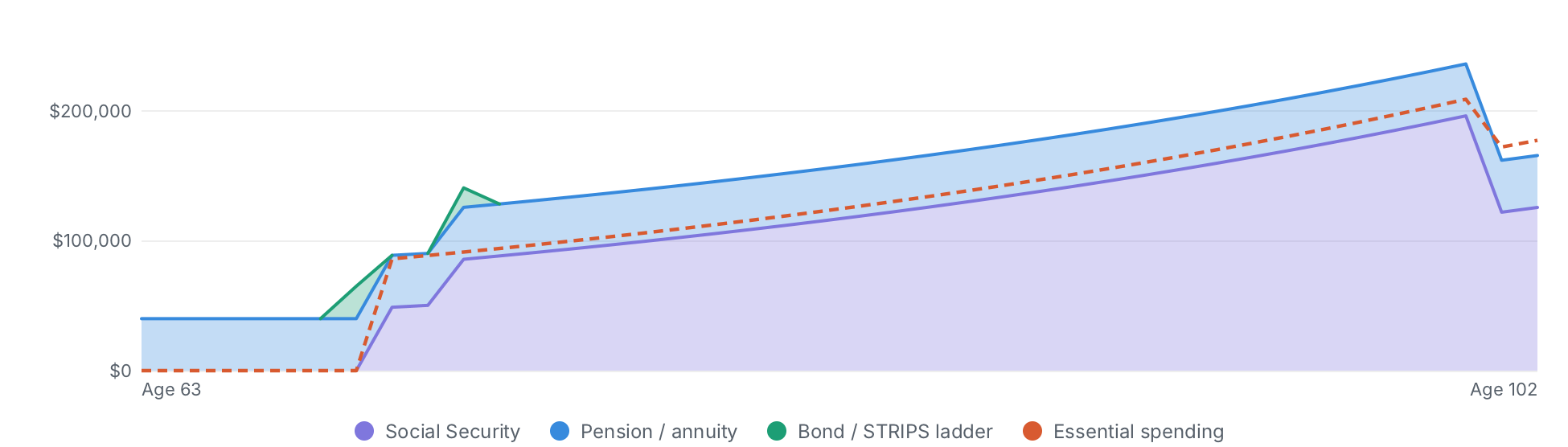
Social Security, a pension and a bond ladder stack up as income you're owed; the dashed line is what you'd call essential. Where the bands clear the line, those essentials are covered no matter what the market does — on this sample plan, 38 of its 40 years: the bond ladder bridges the gap until Social Security starts at 70, and the two years that fall short are the part-year the plan starts in and the year the first Social Security check arrives mid-year. That is the floor under the plan. The part above the line is what your portfolio funds.
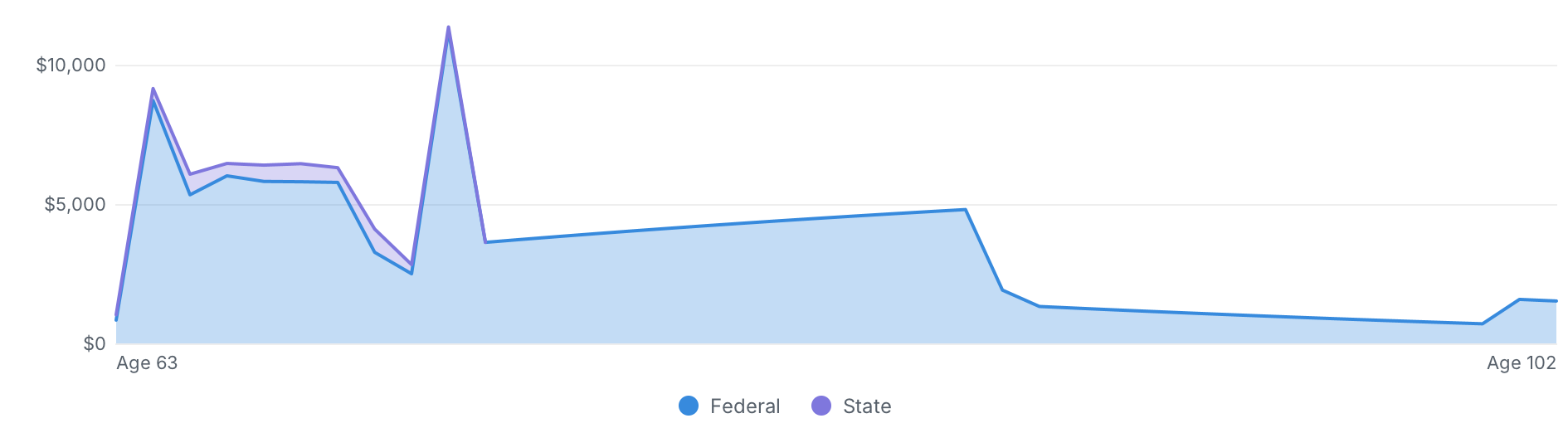
Every year's tax, stacked by what it's made of — federal and state here, with the investment-income tax and Medicare surcharge steps drawn the year they'd bite — in a typical market, the likelier outcome. On this sample plan it comes to about $137,000 over the plan, peaking near $11,000 in the year a one-time expense lands: numbers the plan worked out year by year, not an average rate you guessed at.
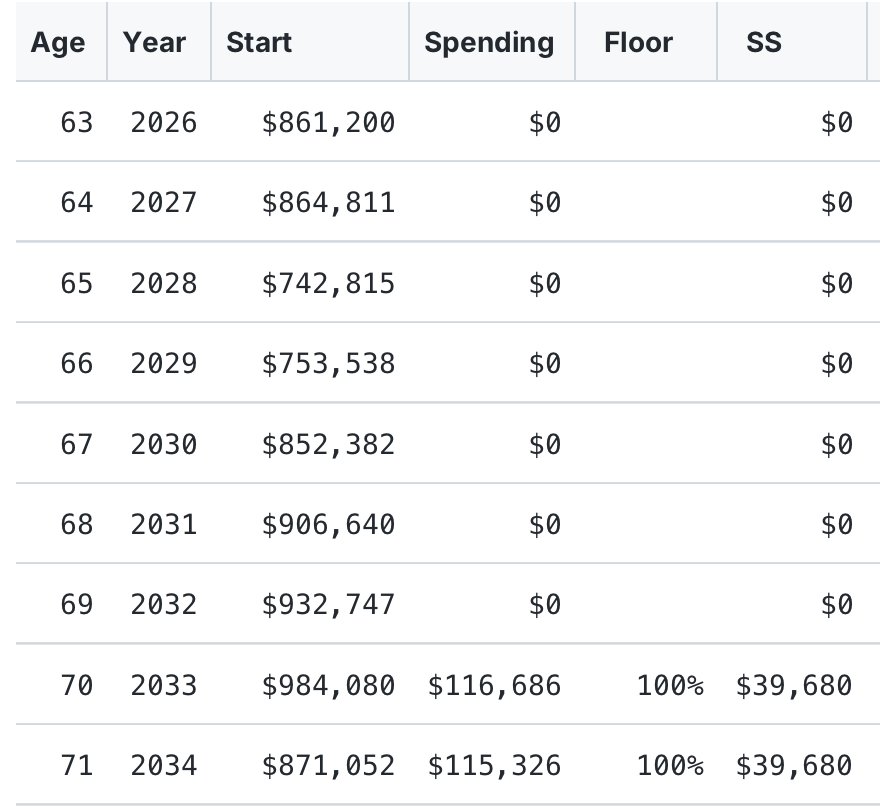
Spending, Social Security, withdrawals, RMDs, Roth conversions and the resulting tax — computed year by year, not estimated from an average rate. The first six columns are shown here; the table scrolls to the rest — and any row opens that year's full arithmetic, down to the tax worked out step by step.
Because this software touches your money, and starting with one platform done well beats spreading thin across several. Building for Apple silicon first means ZBee is a proper native Mac app — notarized by Apple, and local-first by design. We don't custody your financial data: your holdings are never stored on our servers, and connecting your accounts only authorizes a read-only link, so there is no store of your holdings to breach.
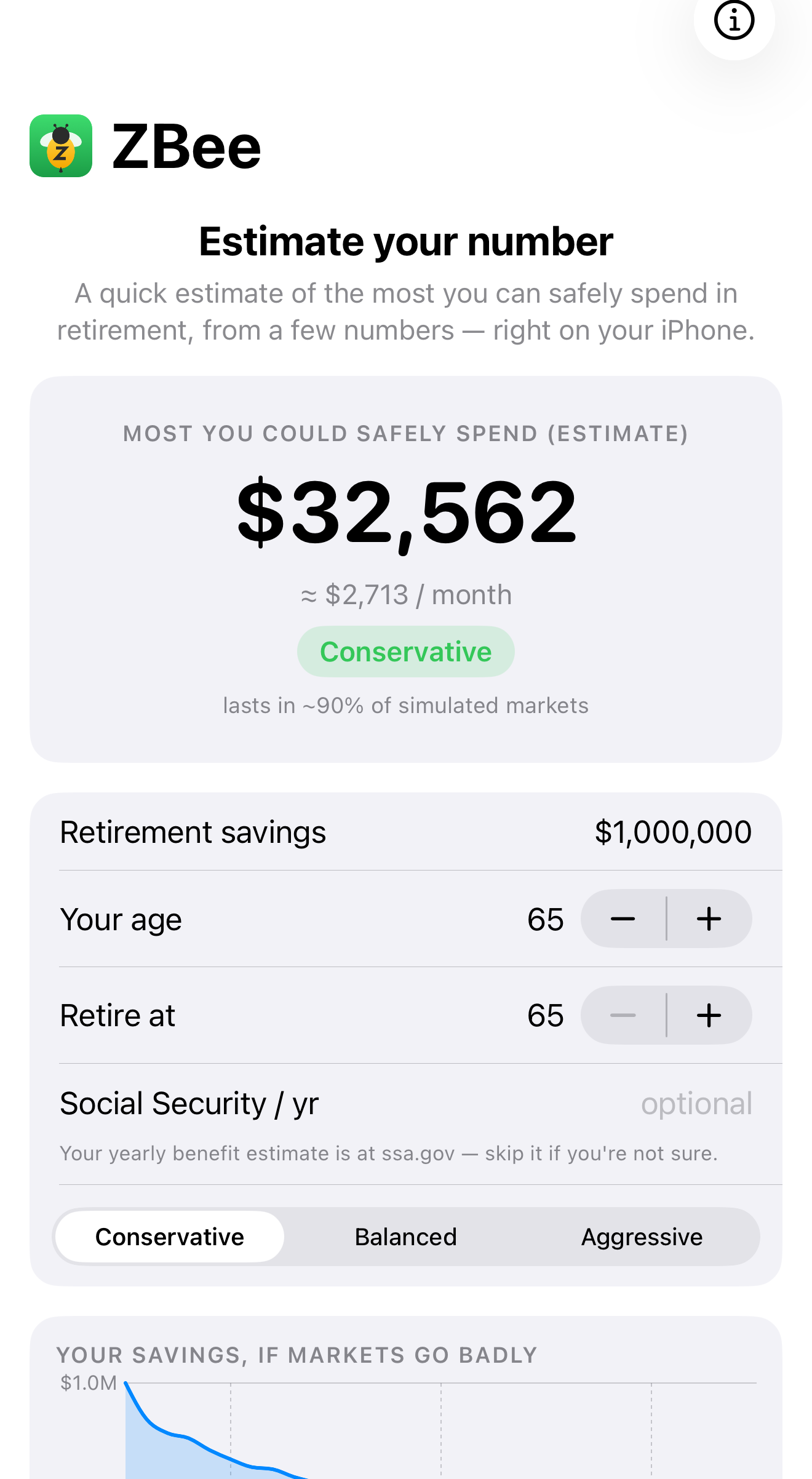
There's a free ZBee app for iPhone and iPad on the App Store — a quick, private estimate of your safe yearly spend that runs entirely on your phone. Other platforms may follow as ZBee grows; whatever comes next will be built for its platform — properly native, not a lowest-common-denominator port.
Most money apps custody your financial data on their servers. ZBee doesn't: ZBee stores your accounts, balances, and plans on your device and never on our servers. (SnapTrade, the service that carries a brokerage link, handles what it reads under its own privacy terms.) The app's routine connections, such as update and license checks, carry none of your financial data, and a screenshot or PDF you choose to have read is not kept by ZBee. A built-in Privacy & Data screen lays out exactly what's stored and what leaves your Mac, and lets you delete your data on your device and your account on our servers in one step. Read the Privacy Policy for the details.
ZBee is built by an independent developer — not a venture-backed startup with growth targets and an appetite for your data. That's the whole reason it works the way it does: a flat, honest price, your finances kept on your own machine, and a real person reading support@zbee.app. One tool, done carefully, sold straight. And you don't have to take the math on trust: every assumption and method ZBee uses is published in the methodology. Who builds ZBee — and why →
Try the whole thing free for 30 days — every feature, on your own figures, no account and no card. After that your plan stays on your Mac and still exports; keeping it updating is what you subscribe for. ZBee Pro is a flat $132 a year. For context, an advisor charging 1% of assets runs about $5,000 a year on a $500,000 portfolio. See how ZBee compares.
No account, no card. Your holdings are never stored on our servers.
auto-renews until you cancel · 30-day refund
Download ZBee and build your plan on your real holdings — no sign-up, no card. Subscribe in File → Subscription… when you want it to keep updating.
30-day money-back guarantee — if Pro isn't right for you, email support within 30 days for a full refund. Cancel anytime; Pro runs to the end of your paid period. Payments are handled by Stripe — your card details never touch ZBee's servers.
Why a subscription, not a one-time price? Because what Pro adds is a running service, not a feature unlock: the read-only brokerage connection is a per-user service ZBee pays for as long as yours stays connected, and the year-end review is written fresh each December.
With guardrails on, Pro also keeps the running record of the level they guide you to — every trim and raise, kept on the Performance page — a walk through retirement, not a one-time answer. A pay-once app can't sustain any of it honestly. One flat price, nothing above it — $132 covers everything Pro does.
No sign-up, no card. Add your holdings and see your safe starting spend, free for 30 days. After that, subscribe ($132/year) to keep it updating. Your plan stays on your Mac, readable and exportable, either way. Built for Apple silicon Macs (M1 or later) with macOS 11 or later.
Notarized by Apple · Published by ZBee LLC · iPhone app on the App Store
No sign-up, no card · Annual Pro subscription · macOS 11 or later on Apple silicon (M1 or later, not Intel) · Built for US taxpayers
Not sure which chip your Mac has? Choose Apple menu › About This Mac. A Chip line (Apple M1 or later) means ZBee runs; an Intel Processor line means it won't.
Version 2.7 · updated October 13, 2026
ZBee is downloading
Requires Apple silicon (M1 or later) and macOS 11 or later.
 ZBee™
ZBee™